
How to Create Social Media Images with Nano Banana AI on Kimg AI
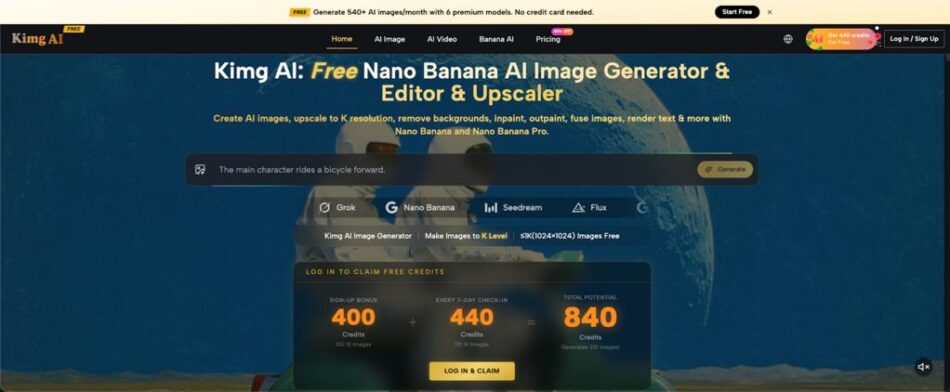
Repeated revision rounds can drain the time planned for publishing, testing, and community engagement. A campaign image may pass between a social media manager, designer, and stakeholder several times before approval. Kimg AI reduces that friction by bringing AI Image Generation into one practical workspace.
Its Nano Banana AI model is available within the Kimg AI platform, rather than operating as a separate brand, and helps turn prompts or reference photos into adaptable visual assets. Alongside Banana AI and other supported models, the platform gives social teams a faster way to explore concepts, restyle content, replace backgrounds, and prepare fresh variations. The goal is not to remove creative judgment, but to reduce repetitive production work while keeping the social manager in control of the idea, source material, and final selection.
What Is AI Image Generation?
AI Image Generation uses written instructions, uploaded images, or both to produce new visuals. It can create an image from a concept, reinterpret a photo, apply another visual style, replace a background, or adjust selected details.
Within Kimg AI, the feature is part of a broader image creation and editing platform. Users can work with Nano Banana and supported models such as Seedream, Flux, Qwen, GPT-4o, and Grok. Social media managers can therefore create original content or repurpose approved assets. One product photo, portrait, or campaign image can become the starting point for several new concepts without arranging a separate shoot for every variation.
Traditional Image Production Challenges
- Slow revision cycles when stakeholders repeatedly change backgrounds, layouts, or visual tone.
- Limited asset variety when one campaign must supply posts, stories, ads, and seasonal versions.
- Inconsistent creative direction when contributors interpret the same brief differently.
- High production costs for frequent photography, illustration, stock content, or outsourced editing.
- Difficult creative testing when producing several versions takes too long.
These pressures can make teams reuse images or test fewer ideas. AI tools reduce the work required for early visual exploration, but they still depend on a clear brief and human review.
The social media manager remains responsible for the audience, message, brand boundaries, and final choice. The generator supports production; it does not replace campaign judgment.
How Kimg AI Handles Image Generation
Multi-Model Image Creation
Kimg AI places several image models in one generation environment, including Nano Banana, Seedream, Flux, Qwen, GPT-4o, and Grok. Users can select a model suited to the result they want instead of relying on one option for every task.
Social teams can also compare how models interpret the same campaign idea and keep the version that best fits the brand and content objective.
Reference-Based Photo Transformation
The platform supports workflows based on uploaded source images. Users provide a photo, describe the intended change, and generate a revised version. The page presents this approach for product imagery, portraits, sketches, and other existing assets.
This is useful when a campaign already has approved photography. The original asset can guide a new setting, style, or composition. Nano Banana supports up to four reference images for consistency and image blending.
Style, Background, and Detail Editing
The feature page highlights style transfer, background replacement, photo enhancement, and object editing. Suggested transformations include anime, oil painting, watercolor, pencil sketch, pixel art, and 3D-inspired visuals.
A product image can become a seasonal lifestyle scene, while a portrait can be restyled for a themed post. Every result should still be checked for recognizable products, people, text, and brand details.
Output & Usage – Ready for Real Content
Resolution depends on the model and plan. The page lists 1K, 2K, and 4K generation for different model options, while eligible paid plans include no-watermark output and commercial licensing.
Before publication, users should confirm the terms attached to their plan. They should also inspect generated text, logos, faces, and product features at full size.
How to Generate Social Media Images
Step 1 – Prepare Input
Start with a clear text concept or a suitable reference image. A useful prompt identifies the subject, setting, style, lighting, composition, and intended format. For example: “Minimal skincare bottle on a pale stone pedestal, soft morning light, clean editorial photography, centered Instagram composition.”
When editing an asset, state what must stay unchanged. You might preserve the product shape and label placement while requesting a warmer background or seasonal setting.
Step 2 – Configure Settings
Choose the image model that fits the task. Nano Banana Pro is presented as a higher-resolution option, while the generator also includes Nano Banana, Seedream, Flux, Qwen, GPT-4o, and Grok.
Add reference images when consistency matters, then make the prompt specific about the required change. Use only settings available in the current interface, because model and output options can vary by account or plan.
Step 3 – Generate & Export
Click Generate and review the image for composition, unwanted objects, distorted text, inaccurate product details, and brand fit. Revise the prompt or reference material and generate another version when necessary.
Download the selected result for the rest of your content workflow. Crop it, add approved copy, or complete final checks in your usual design tool. Reuse it in campaigns or client projects according to Kimg AI’s current terms and the rights connected to your plan.
Use Cases for Social Media Managers
- Campaign Concept Testing — Social managers generate several visual directions from one brief before committing more production time.
- Product Content Variations — E-commerce teams restyle approved product photos for launches, promotions, and seasonal posts.
- Platform-Specific Creatives — Content teams adapt one idea into visuals for feeds, stories, thumbnails, and paid placements.
- Evergreen Asset Refreshes — Brand managers update older photography with new backgrounds or styles instead of repeating the original post.
FAQ
How does the workflow actually work?
Enter a prompt, upload a source image when relevant, select an available model, and click Generate. Review the result, refine the instructions if needed, and download the chosen image for further preparation.
Can generated images be used commercially?
Kimg AI states that commercial licensing is included with eligible paid plans. Conditions can depend on the plan, source material, and current terms, so users should verify them before publishing commercial or client work.
Can Nano Banana use multiple references?
The feature page states that Nano Banana supports up to four reference images. This can help with consistency, style matching, or combining guidance from several assets, although each result still requires review.
Conclusion
Kimg AI combines prompt-based creation, reference-image transformation, style changes, background editing, and multiple model choices in one AI image generation workflow. For social media managers, its value lies in producing more concepts and variations with less repetitive coordination.
Try the feature with a real campaign brief and an approved source asset. Begin with one focused change, compare the output with your brand standards, and refine the prompt until the image fits your content process.
Relacionado