AI Canvas workflow studio: Build cinematic aI workflows in minutes
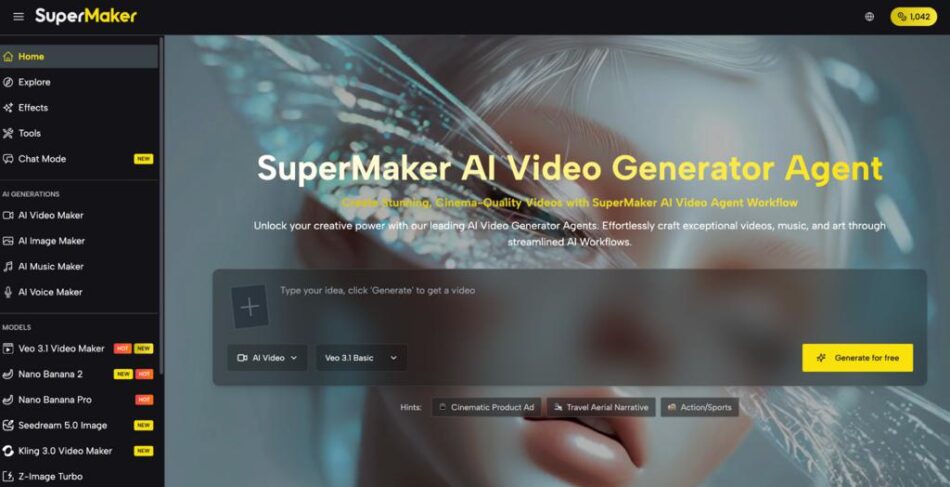
Creating high-quality video has always been a trade‑off between time, budget, and complexity—especially when you’re stitching together separate AI tools for images, scripts, music, and voice. With AI Canvas Workflow Studio, you can finally orchestrate this entire process visually, turning scattered assets into a cohesive production pipeline on a single, infinite canvas.
SuperMaker is an all‑in‑one AI creative ecosystem that combines an AI Video Maker, AI Image Maker, AI Voice Maker, AI Music Maker, and a visual Studio into one connected platform. Together, these tools let you move from idea to finished video while keeping every shot, image, track, and voiceover in sync inside the same environment.
Why Choose SuperMaker AI Canvas Workflow Studio
SuperMaker AI is built as a complete creative suite, not a single‑purpose generator. You get Text‑to‑Video, Image‑to‑Video, AI image generation, voice synthesis, music creation, and a node‑based AI Canvas Workflow Studio that ties everything together visually.
Instead of jumping between disconnected apps, SuperMaker centralizes scriptwriting, storyboarding, asset management, and post‑production in one workspace. This reduces the friction of exporting, re‑uploading, and re‑configuring files, letting you focus on creative direction rather than tool logistics.
Real Scenarios Highlighted on the Website
Across the SuperMaker site, you can see how different creators and industries use AI Video Maker and Canvas workflows in practice. Examples include:
- Marketers and businesses produce product demos and video ads that convert faster.
- Content creators and YouTubers turning scripts and blog posts into dynamic episodes and tutorials.
- Educators and trainers transforming lessons into visual modules and animated explanations.
- Social media managers generating short, platform‑ready clips and trends for TikTok, Instagram, and more.
- Aspiring filmmakers and storytellers building script‑to‑storyboard workflows for short films and episodic content.
Core Features of SuperMaker AI Canvas Workflow Studio
SuperMaker’s AI Video Maker is designed for cinematic storytelling while still being practical for everyday marketing, education, and social content. It pairs a powerful AI Video Maker with integrated audio, image, and workflow tools so you can go from idea to finished MP4 in a few guided steps.
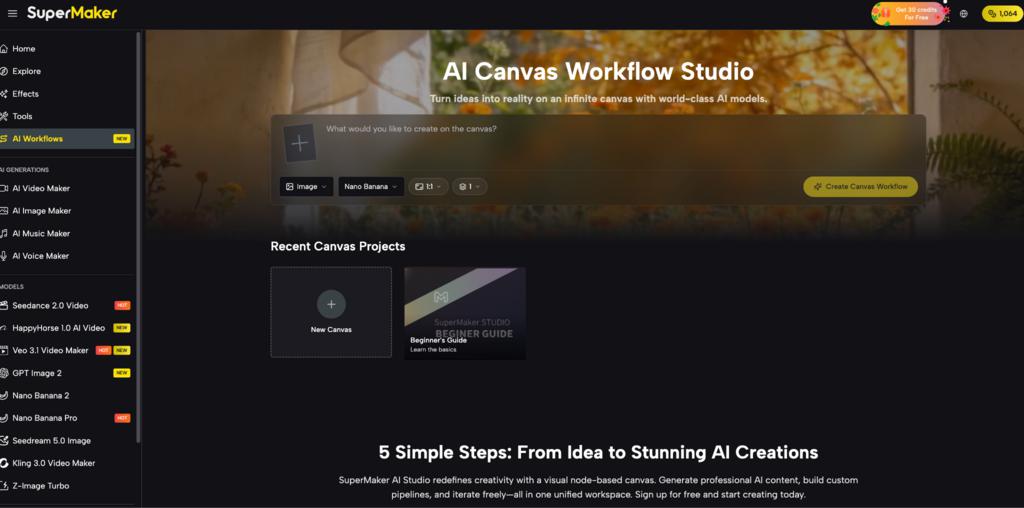
Within this ecosystem, AI Canvas Workflow Studio becomes your control room: a place to visually connect prompts, models, and assets into repeatable multi‑step pipelines.
AI Video Creation
SuperMaker supports two main generation paths: Text‑to‑Video and Image‑to‑Video.
You can describe your concept or share detailed scripts for Text‑to‑Video, letting the AI Video Generator create corresponding scenes from narrative input. You can also start from static images for Image‑to‑Video, turning photos, artwork, or frames into motion sequences.
- Text‑to‑Video for turning descriptions, scripts, or articles into full scenes.
- Image‑to‑Video for animating reference images into dynamic content.
- AI Canvas Workflow Studio to chain text, image, and video nodes into end‑to‑end pipelines.
Editing & Customization
SuperMaker gives you extensive creative control over how your videos look and feel. You can adjust styles, resolutions, and aspect ratios so each output matches your brand or platform needs.
Inside the broader workflow, you’ll find AI‑powered scriptwriting and storyboarding tools that help you plan and visualize your narrative before generation. Combined with advanced video editing and effects, this turns SuperMaker into a production environment, not just an output generator.
- Define resolution and aspect ratio to fit landscape, portrait, or cinematic frames.
- Use intelligent storyboarding to map scenes ahead of time.
- Refine footage with editing tools and effects for polish and consistency.
Multi‑Modal Capabilities
SuperMaker’s ecosystem is deeply multi‑modal: video, image, voice, music, and chat all work together. AI Image Maker handles concept art, product visuals, and illustrations; AI Voice Maker generates natural voiceovers in multiple languages; AI Music Maker composes royalty‑free soundtracks tailored to your video.
AI Canvas Workflow Studio ties these tools into a visual pipeline where text, image, and video nodes connect into a unified story engine. You can batch‑run projects, analyze video storyboards, and iterate quickly while keeping all assets organized on the canvas.
- AI Image Maker for concept art, product imagery, and scene visuals.
- AI Voice Maker for voiceovers, narration, and dialogue.
- AI Music Maker for custom, royalty‑free background scores.
- AI Canvas Workflow Studio for node‑based orchestration of all these media types.
How SuperMaker AI Video Maker Works
SuperMaker’s AI Video Maker is structured around a streamlined, three‑step journey that aligns neatly with Canvas‑based workflows.
Step 1 – Access the Tool
Start from the dedicated AI Video Maker page or launch a project inside AI Canvas Workflow Studio. On the Studio canvas, you add Video nodes to your infinite workspace; on the Video page, you work through guided forms focused on Text‑to‑Video or Image‑to‑Video.
Step 2 – Enter Input & Configure
Provide your text description, script, or upload reference images depending on whether you’re using Text‑to‑Video or Image‑to‑Video. Then choose resolution, aspect ratio, and any relevant style or model options, ensuring the output fits your target channel and use case.
Step 3 – Generate & Export
Click Generate to let SuperMaker’s AI Video Generator process your inputs into a complete video. Preview the result, refine if needed, and then download in MP4 or route it through Canvas workflows for further editing, audio integration, or multi‑asset compositions.
How to Choose the Right Plan
SuperMaker uses a credit‑based system that covers the entire suite: AI Video Maker, AI Image Maker, AI Voice Maker, AI Music Maker, and Canvas workflows. Credits roll over if unused on paid plans, and you can spend them flexibly across video, image, music, and voice generations rather than buying separate quotas per tool.
Here is a simplified view of the main plans based on SuperMaker’s pricing information:
Plan | Price (Yearly Billing) | Credits / Year | Typical Outputs* |
Free | Free | Limited weekly credits | Small number of videos, images, music, and voice tracks |
Basic | $100/year | 2,400 credits | Suitable for regular creators and small teams |
Popular | $288/year | 9,600 credits | For growing teams with higher content volume |
Pro | $360/year | 21,600 credits | For power users and agencies with heavy workloads |
Outputs vary by how you balance video, image, music, and voice usage within your total credits.
Frequently Asked Questions
Who is SuperMaker AI Canvas Workflow Studio and AI Video Maker best for? SuperMaker is ideal for marketers, content creators, educators, social media managers, game developers, and filmmakers who need to coordinate multiple media types—video, image, voice, and music—within a single visual workflow.
Do I need advanced technical skills to use AI Canvas Workflow Studio? No. The Studio uses a drag‑and‑drop, node‑based canvas where you connect text, image, and video nodes visually, with the system validating compatible connections so you don’t break your pipeline. This makes complex workflows accessible even if you’ve never coded or used traditional NLE software.
What kind of output quality can I expect? SuperMaker focuses on cinema‑quality visuals, high‑resolution images, and professionally synchronized audio, with support for high‑quality video and 4K image generation in Studio. Paid plans unlock HD, watermark‑free downloads suitable for commercial work across marketing, social, education, and film.
How does the pricing logic work across tools? Credits act as a universal currency across SuperMaker’s ecosystem: each video, image, music track, or voiceover consumes a specific number of credits, and your chosen plan sets your allocation. This lets you shift usage freely—more video one month, more images or music the next—while keeping Canvas workflows and generation costs predictable.
Conclusion
SuperMaker’s AI Canvas Workflow Studio and AI Video Maker combine into a single, visual environment where you can script, generate, refine, and publish multi‑modal content without leaving the platform. By unifying video, image, voice, music, and workflows, it turns complex, multi‑tool production into an organized, repeatable process that fits how modern creative teams actually work.
If you’re ready to cut production time, expand your creative range, and keep full control over every frame and sound, SuperMaker gives you a scalable path from first idea to final cut. Explore the AI Video Maker directly at AI Canvas Workflow Studio or start building your visual pipelines inside Studio to see how fast an AI canvas workflow can transform your content operations.
Relacionado